.png)


The 7-Step monday CRM Data Migration Checklist for 2026: Chaos to Clarity
- Ishani Dhar Chowdhury

- Jan 9
- 6 min read

Think about this: what if your biggest sales obstacle isn't market conditions? It could be the huge mess of data silos that's lurking in your current database.
Turns out, a proper monday CRM data migration checklist can turn that liability into your competitive edge. According to IBM research, poor data quality in any organisation can drain revenue of more than USD 12.9 million every year.
Most companies approach migration backwards. For instance, they focus on the new system first and forget to configure everything properly.
Without a CRM data cleansing strategy and plan to prevent duplicate contacts, you'll bring along data inconsistencies. In this blog post, we'll discuss a seven-step monday CRM data migration checklist that will help your team make smart decisions.
#1. Audit Your Existing Data Ecosystem

Before you start your monday CRM data migration checklist, document where your customer data actually lives. Do this by pulling up every spreadsheet, email platform, internal database, payment information, and system data.
Collaborate with your sales, customer service, accounting, and marketing teams to list an audit inventory:
Departmental database with local file storage.
Current contact management system or CRM data.
Accounting software that contacts billing and payment records.
Support ticket systems that track client interactions.
Excel or Google Sheet files with customer information.
Email marketing platform information from Mailchimp or HubSpot.
How Can Fruition Help?
Fruition's monday CRM professionals will map every data source and account for workflow dependencies. We will analyse integration touchpoints during discovery sessions.
With our help, you can count records in each source. For example, a 500-row spreadsheet will require different handling than a 50,000-contact database.
During this, our team will identify duplicate customer information to ensure the CRM data cleansing strategy is met. We've completed more than 500 projects that helped clients document fragmented data landscapes.
#2. Define Your Company's Data Mapping Needs for the monday CRM Data Migration Checklist
It's true: monday CRM will structure data differently than your current system. For example, available column types for importing include Text, Date, Numbers, Phone, Timeline, etc.
The company name field will become 'Account' in monday CRM, and the full name cell will split into 'First/Last Name' fields. Every legacy field will need its destination mapped before migration begins.
Some of the common challenges you'll face include:
Full name split into first and last name fields.
Custom fields require new column creation in monday CRM.
Phone numbers are standardised with proper country code formats.
Single address blocks are separated into city, street, state, and zip code columns.
Date formats convert between different system standards.
Fruition's Take
To get the best out of this monday CRM data migration checklist, you'll have to create a mapping spreadsheet. It should include three columns:
Source field.
Destination field.
Transformation rules.
During the discovery phase, Fruition consultants will help you analyse team structures with existing project management processes. We'll also determine automation opportunities for complex migrations to avoid ruining workflows.
This will become a migration blueprint that every team member can reference. Proper mapping prevents data from landing in the wrong columns, which could corrupt reports or automations.
#3. Establish Data Quality Standards

What percentage of your database actually contains complete and usable data? If you hesitate to answer this, your data isn't clean enough.
The CRM data cleansing strategy starts with enforceable rules and an honest assessment with clear standards. Don't forget to decide the mandatory requirements before the migration chaos.
The ideal data quality standards checklist includes:
Valid email format verification rules.
Minimum deal information needed for pipeline records.
Complete address requirements for shipping.
Required fields that every contact must contain.
Phone number standardisation patterns.
Consistency Matters During CRM Migration
Ensure standards are set in plain and understandable language. Consistency matters more than perfection when it comes to handling customer data.
These strict metrics will help keep the data clean and consistent. This is also essential for preventing duplicate contacts in monday CRM during import.
Fruition's certified monday.com consultants will meticulously map existing workflows against industry benchmarks. We will analyse bottlenecks and efficiency gaps to create varying quality standards as part of the monday CRM data migration checklist.
#4. Implement Duplication Protocols

A Salesforce study reports that an average customer contact database will have more than 25% duplicate data. In fact, it contains 90% of incomplete contacts.
This proves that your database will have duplicates. That's inevitable. But the question is, how many?
Preventing duplicate contacts in monday CRM requires systematic identification. Remember to find and merge them in your legacy system before importing. You can match records using these criteria:
Company name combined with job title.
Identical email addresses.
Similar names accounting for typos.
Physical addresses with slight variations.
Matching phone numbers despite formatting differences.
monday CRM Manage Duplicates Feature

Let's say you've forgotten to do this before the monday CRM data migration. Thankfully, there's a native Manage Duplicates feature that helps post-migration cleanups.
Follow these steps:
Navigate to the three-dot menu in your board.
Hover over More actions.
Select Manage duplicates.
Choose which column to search. It'll support Text, Email, Link, Name, Country, Numeric, and Status columns. Once selected, you can identify items with identical values in a side-by-side review. Then, select which record to keep, make final edits, and click on Merge Items.
#5. Cleanse and Standardise Records

You get to fix individual record quality by handling duplicates. Every contact will need a completeness check, accuracy verification, and formatting correction.
This is a step that determines whether your CRM data cleansing strategy succeeds or fails. Some of the record cleansing tasks include:
Validating email addresses and removing bounced contacts.
Capitalising names and consistently using proper Title Case.
Deleting test records, inactive accounts, and placeholder entries.
Standardising phone formats to one pattern.
Updating outdated job titles and acquired company names.
Automation to the Rescue
monday CRM automation tools can help with bulk corrections. Fruition can run automated cleansing scripts that handle common issues like obsolete data.
Examples include standardising fields, merging duplicates, and flagging inactive contacts. As a result, only clean and active records remain.
monday CRM consultants at Fruition will help set rules to archive contacts untouched beyond the retention period. We'll also manually review high-value accounts to ensure accuracy. Data will become trustworthy and updated amidst the clutter.
#6. Test Migration with Sample Data
You should never import your entire database in one go. Thankfully, monday.com experts walk you through the process of importing your data.
The team at Fruition can test the accuracy and completeness before validating it as part of the monday CRM data migration checklist. We'll create a sample that covers record types and edge cases. These include:
Top revenue accounts with complete data.
Contacts with special characters and unusual formats.
Records missing optional fields to test how blanks import.
International records with varied addresses and phone formats.
Both recently updated records and legacy data.
Fruition's Help
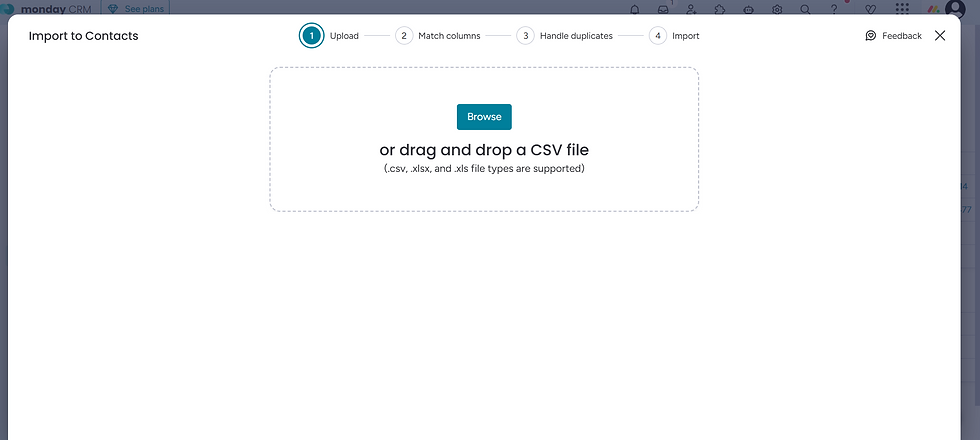
We will import these to monday CRM using the CSV file option. Once done, we get to verify every field correctly and implement our CRM data cleansing strategy. Our team will then test out automations and document issues before adjusting them.
Before complete deployment, Fruition aims to run multiple test migrations to refine processes and reduce final migration issues.
#7. Execute and Validate Full monday CRM Data Migration Checklist
If the testing is successful, you can now schedule a full monday CRM data migration checklist execution. Do this during a low-activity period.
Communicate this migration window clearly with all team members and stakeholders. You should also lock down legacy systems to prevent data changes during transfer.
Here's a post-migration validation checklist:
Compare record counts (source and destination systems).
Run monday CRM reports (verify data integrity across fields).
Manually spot-check for accuracy (5% to 10% of migrated records).
Beyond these, don't forget to test search functionality and automation triggers. Once the import completes, you'll see a progress bar and receive notifications when successful.
How Does Fruition Help?

Fruition will:
Document discrepancies and resolve them.
Maintain rollback procedures.
Monitor initial stage patterns to avoid data structure confusion.
Address questions quickly to prevent workarounds.
A successful migration will mean your team can work in monday CRM with confidence.
To End With
Your monday CRM data migration checklist transforms accumulated data chaos into a strategic advantage. This seven-step framework will prevent costly mistakes that plague rushed migrations.
Fruition has helped 200+ clients around the world with robust data migration processes. We invest in pre-migration planning and ensure post-migration cleanup.
All that enables accurate forecasting, reliable automation, and confident decision-making. Ready to execute a flawless migration? Reach out to a certified monday.com expert at Fruition to assist you through every migration stage without any data loss nightmares.
FAQs
How long does a typical monday CRM data migration take?
The timeline usually varies based on data volume and the monday CRM data migration checklist. Simple ones with clean data take between two to three weeks from discovery to go-live. Complex multi-source migrations need extensive cleansing and can take up to 12 weeks, including thorough testing phases.
Can you migrate data to monday CRM without technical expertise?
monday.com provides Excel and CSV file imports with column mapping capabilities. Basic migrations work fine with built-in tools. However, complex transformations, serious deduplication, and quality assurance benefit from certified consultant expertise.
What happens to old CRM data after migration?
Archive legacy system data according to retention policies. Fruition recommends maintaining read-only access for three to six months post-migration for reference purposes. It's better not to delete source data until thorough validation, implementation, and adoption.


