.png)


monday CRM SSO, Audit Logs, and Multi-Level Permission Setup Guide: Enterprise Security Checklist for 2026
- Ishani Dhar Chowdhury

- Jan 9
- 6 min read
Do you think your CRM security meets the official enterprise compliance standards? Thankfully, monday CRM users can be confident about the enterprise-grade protection offered.
According to a 2024 report by IBM, an average data breach can cost USD 4.88 billion. This demands a reform to ensure a robust security architecture that the monday.com company understood.
For organisations implementing the monday CRM SSO setup guide protocols, security becomes mission-critical. In this blog post, we'll address CRM compliance consulting needs to configure multi-level permissions and audit logs.
Understanding Security Architecture: monday CRM Enterprise
Based on UpGuard statistics, monday WorkOS scores a solid 911 out of 950 in security ratings. It measures and controls standards and regulations to protect data, ensuring compliance with international or local laws.
monday CRM's enterprise security has a lot of layers. It usually revolves around three fundamental pillars. They include:
Single Sign-On (SSO): Centralises authentication through the SAML 2.0 protocol with identity providers.
Audit Logs: Provides 360-degree visibility into various security-related monday CRM account activities.
Multi-Level Permissions: This monday.com framework keeps track of granular access control and provides governance over organisational hierarchies.
These monday CRM enterprise features work synergistically. As a result, users can create a defence-in-depth security system.
Example: SSO eliminates password vulnerabilities that affect more than half of security breaches. Similarly, audit logs can satisfy the GDPR and SOC 2 documentation requirements. Also, permission hierarchies prevent any unauthorised exposure across departments.
Fruition's Suggestion
Before implementing, we suggest you assess your current security posture. Follow these steps:
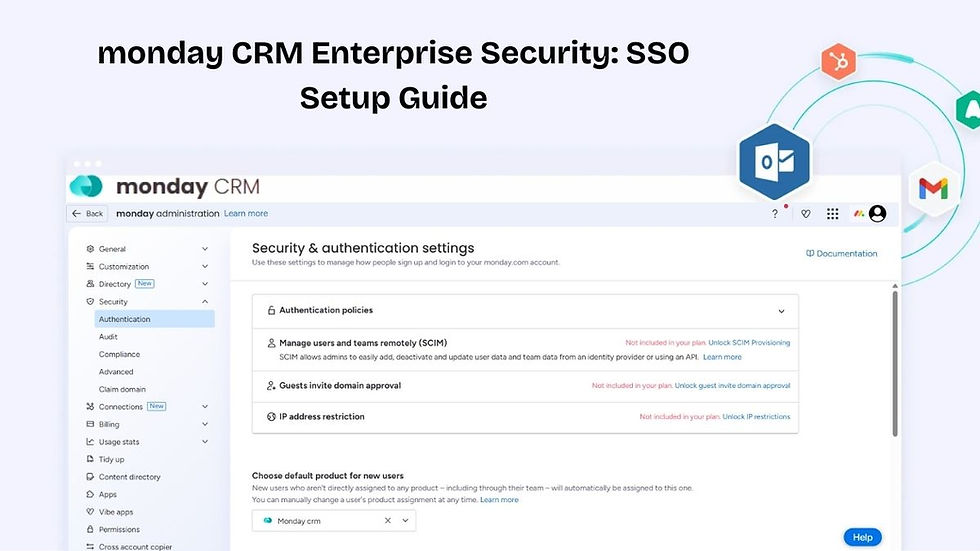
Navigate to your profile picture section in monday CRM.
Select Administration.
Go to Security.
Review existing configurations.

This will ensure your monday CRM SSO setup guide addresses everything. The enterprise consultants at Fruition specialise in security architecture assessments for monday CRM implementations.
Our team conducts comprehensive audits to identify compliance gaps before configuration. Consider this a proactive approach to ensure security frameworks align with industry regulations.
monday CRM SSO Setup Guide: Configuring for Enterprise Compliance

It all begins with a proper SAML 2.0 configuration. Follow these steps:
Go access the Administration section > navigate to Security > Select Single Sign-On (SSO) under Authentication policies > Click 'Add SSO policy' to begin.
Once done, you'll have to carefully identify provider integration:
Choose from Okta, Custom SAML 2.0, OneLogin, or Azure AD/Entra ID.
Enter the SAML SSO URL for your identity provider.
Provide the issuer information.
Upload a public certification for encryption.
Enable the monday CRM certification (if you use SAML responses).
Once done, you must test the SSO connection before activation. After you've successfully tested the monday CRM SSO setup guide, click on 'Add SSO Provider.'
Note: Everyone in your company will receive an email notification prompting them about the new sign-in procedures.
CRM Compliance Consulting: Experts' Recommendation | Fruition's Take
We recommend configuring login restrictions carefully. Choose between allowing all users (+ guests) or only specific users.
You might wonder: what's the difference? Well, the 'Guests' option user 'Only some people' will permit external users with email-password access. The monday CRM experts at Fruition will suggest you consider designating a single user for break-glass emergency access scenarios.
Beyond that, monday WorkOS supports Just In Time (JIT) provisioning. That means users are created automatically upon first login. For enhanced control, we can enable SCIM provisioning to allow automated user lifecycle management.
This type of multi-level permission in monday can be considered best practice for authentication security. Our consultants can also design login restriction policies to balance security requirements with operational flexibility.
Implementing Multi-Level Permission in monday CRM Hierarchies

This feature requires you to perform careful architectural planning. You'll have to start by understanding the four main user types:
Admins: Possess full account-level access across workspaces, security, billing, etc.
Members: Enterprise teams across departments with simple editing capabilities across boards.
Viewers: They only have read-only access.
Guests: These monday CRM users can only access shareable boards they are explicitly invited to.
monday CRM enterprise plans enable granular permission customisations. All you have to do is select the Permissions tab in the Administration option.
Then, configure account-level permissions controlling specific features. You can also create custom roles based on user types, but they cannot exceed inherited permissions.
Let's find out more:
Board-Level Permissions
monday CRM provides a few board-level permission roles, including:
Owner: Bypasses all permission roles with full control over workspaces.
Contributor: Adds and edits items but cannot modify columns.
View and Comment: Post updates without changing files and view items.
Assigned Contributor: Edits items assigned in specific People Columns.
Editor: Creates or edits items, manages structure, posts updates, etc.
Workspace Permissions
Beyond the monday CRM SSO setup guide, you can configure your monday CRM workspace permissions to get extra control layers. Here's how:
Open the workspace homepage.
Select the Permissions tab.
Set different permissions for workspace owners, non-members, and members.
For example, closed workspaces (only on the Enterprise plan) require invites, offering enhanced privacy.
Board and Column Permissions
Board permissions also control structure and content access. You'll have to:
Open the three-dot menu.
Select Permissions.
Choose the sets (Edit everything, Only edit content, View/Comment, etc.)
Review permissions across categories like Updates, Groups, Subitems, etc.

Similarly, monday CRM Column permissions protect sensitive fields. You can restrict who edits or views specific columns. For example, board owners remain unrestricted. Use it for compensation, approval workflows, budgets, etc.
Audit Log Configuration: Understanding Monitoring Protocols
With over 245,000 users, monday CRM has become one of the most sought-after platforms for all businesses. It comes with a variety of unique features like automatic contact creation, interaction tracking, etc.
On the security front, monday CRM audit logs provide accountability for every action. To access it, you'll have to:
Go to Administration.
Select Security.
Open the Audit tab.
Configurations
Ideally, Enterprise plans have access to a full functional audit logging capability that displays detailed security activity reports. You can configure this to capture the following:
Device information and IP addresses used.
Board data experts that need oversight.
User login and logout sessions with timestamps.
Failed login attempts that indicate potential breaches.
Permission changes across organisational levels.
Attachment downloads that require tracking.
Timestamps
Here, the timestamps will display in the GMT zone format. This will be regardless of user location. Currently, monday CRM offers unlimited retention of audit log records, but it may change in the future.
To check it thoroughly, you can filter logs by event type and user name by typing them in the search box.
Did you know you can access audit logs via API for SIEM integration? Generate an API token through the 'Monitor by API' button. The REST API uses the GET HTTP verb. Reach out to a monday API expert at Fruition to know about the base URL format and rate limits.
We provide end-to-end audit log implementation, including integration support. Our methodology includes validation testing to ensure logs capture required compliance events. We'll also offer post-implementation support that includes quarterly security reviews that maintain compliance.
Enterprise Security Checklist: Fruition's Implementation and Maintenance Strategies
You'll need a systematic implementation for successful enterprise security. This checklist is essentially a comprehensive monday CRM SSO setup guide.
Fruition follows these steps for proper deployment:
Phase 1: Pre-Implementation
Time: Weeks 1 and 2
Conducting security requirements analysis.
Mapping compliance obligations to technical controls.
Designing a permissions hierarchy that matches the enterprise structure.
Prepare and select the identity provider integration.
Phase 2: Configuration
Time: Weeks 3 and 4
Implementing the SSO with pilot user groups.
Configuring multi-level permissions in monday across account levels.
Enabling audit logging and verifying event capture.
Setting up API access for external monitoring tools.
Phase 3: Validation
Time: Weeks 5 and 6
Verifying the audit log accuracy and completeness.
Testing SSO authentication flows.
Testing permission enforcement.
Documenting configuration for compliance audits.

Fruition also offers maintenance activities through ongoing commitment. We'll help you manage SSO certifications before expiration, review/remove inactive user accounts every month, and analyse audit logs to check threat patterns. Our team can also integrate monday CRM with existing security infrastructure.
We have enterprise consultants to bring specialised expertise to complex security implementations. This ensures your monday CRM deployment meets the highest governance standards.
FAQs
Can monday CRM integrate with existing identity federation systems beyond basic SAML?
Yes, monday CRM Enterprise supports SAML 2.0 with major providers, including OneLogin, Okta, Azure AD/Entra ID, and custom SAML configurations. Custom ones are for specialised authentication environments that require unique workflows.
How does monday CRM handle automated user provisioning at enterprise scale?
monday CRM supports SCIM 2.0 automated provisioning that enables real-time synchronisation with identity providers. It automatically creates accounts, updates permissions, and deprovisions users based on directory changes.
What audit log retention capabilities exist for long-term compliance requirements?
Currently, monday.com retains audit log records indefinitely without automatic deletion. Even then, future updates may introduce retention limits. monday CRM Enterprise plans access audit logs through API for export to external SIEM platforms.