.png)


monday CRM: How To Generate Quotes and Proposals? [2025 Guide]
- Ishani Dhar Chowdhury

- Aug 11, 2025
- 6 min read

Sending quotes, proposals, or invoices might initially seem straightforward for your small business. But as your company grows, there'll be a lot going on with creation, revision, and deal signing.
This can lead to delayed payments if you aren't using tools like monday CRM for proper invoice generation and management. Statistics suggest that 24% of businesses attribute late payments to administrative and invoicing errors.
Industry leaders note that companies with detailed payment instructions for invoice experiences have improved payment times. That's why you'll need a proper management tool, such as monday Sales CRM.
In this blog post, we'll discuss creating quotes, proposals, and invoices in the monday.com CRM tool.
Document Generation in monday CRM: What Are the Capabilities?
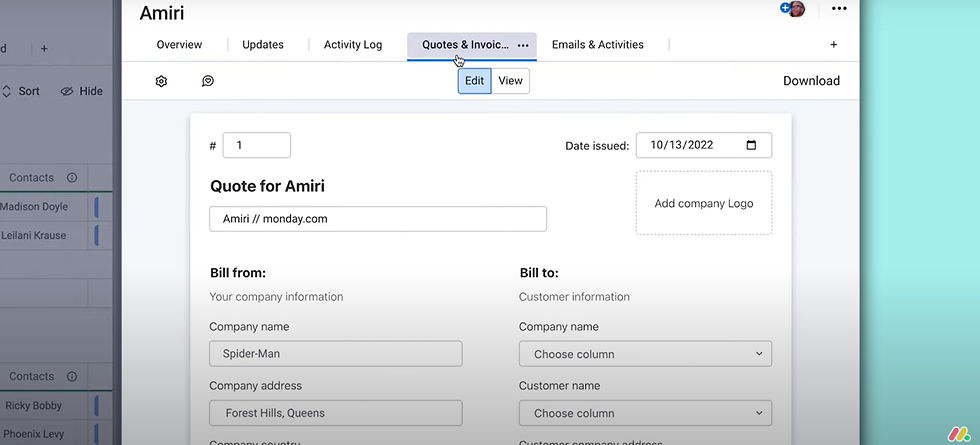
According to Salesforce, the quote-to-cash (QTC) process consists of account management, sales, billing, order fulfilment, and more. With monday CRM's unified platform, you can streamline the entire QTC without hassle.
It can automate the creation of invoices, proposals, and quotes directly from the CRM board data, reducing errors and accelerating deal closure. Your sales team can leverage customisable templates with dynamic content insertion, conditional logic, and company branding.
monday.com CRM supports multi-currency transactions and integrates with popular tools, like DocuSign or QuickBooks, to enable direct email delivery. Some of its functionalities include:
Customisable invoice templates from real-time data.
Automated quote creation with company branding.
Proposal generation using dynamic content insertion.
PDF export for all document versions.
Direct document sending with the Emails & Activities integration.

The document creation features also include conditional logic, a template library, bulk document generation, and real-time document tracking. You can also embed payment links, get revision history, and more.
As monday experts, the team at Fruition would also like to highlight the DocuGen app in monday WorkOS. It enables you to generate Word and PDFs using automations based on status changes and data to create proposals, invoices, and quotes.
Our team can help you set this up by integrating the app, creating a document template, and setting up automations.
How Do You Implement monday Sales CRM's Document Generation Features?
The monday WorkOS platform was worth USD 282.3 million in the first quarter of 2025, growing at 30% YoY. Currently, there are over 245,000 monday users across the globe with a 112% net dollar retention rate.
All these were possible because of the unique features offered. For instance, monday CRM streamlines document creation for quote, invoice, and proposal generation.
These eliminate manual processes and ensure professional presentation with seamless workflow automation within your sales cycle.
Create the Document

Ideally, there are three ways to get started with a new quote, invoice, or proposal document on monday CRM. They include:
Page: Only available in monday CRM, you'll find this in the top left panel. Click on 'create new' to get started.
Column: Open Column Centre, search for 'Quotes & Invoices,' and add it to your monday Sales CRM board. Then, choose an empty cell to add the document by selecting templates from the list or creating a new one.
Item Card: Select the Updates Section of an Item, navigate to More and choose 'Quotes & Invoices [New Version].' Create a new document with this view.
All documents created from either of these steps will be saved in the monday CRM's Quotes & Invoices page.
Choose or Create a Template

After opening the Quotes & Invoices feature, you'll be prompted to:
Choose a Template: Click New Document and search for a proposal or invoice template that suits your needs. Select a template name and get started.
Create a template: Go to the settings of a new template to make changes to the serial number format, accent colour, date format, document type, template name, invoice header, company branding, and other details.
If you need assistance, feel free to contact a monday.com expert at Fruition. We can create an invoice, proposal, or quote template for you as a custom document that meets your sales team's billing requirements.
Complete the Document

Typically, invoices or quotes are connected to your Contacts Board or a board that lists products or services. The data for your document will be pulled into the empty fields from the connected boards.
To ensure everything is streamlined in your monday Sales CRM account, follow these steps:
Add the invoice, quote, or proposal details by editing the document description.
Then, you'll have to choose a source to extract data from.
Select the recipient's name and choose the fields to use for their details.
Next, add your services or products and make price adjustments by toggling between a fixed amount or percentage.
Enable signature collection and include a counter signature.
Export the document as a PDF.
Customise the Template
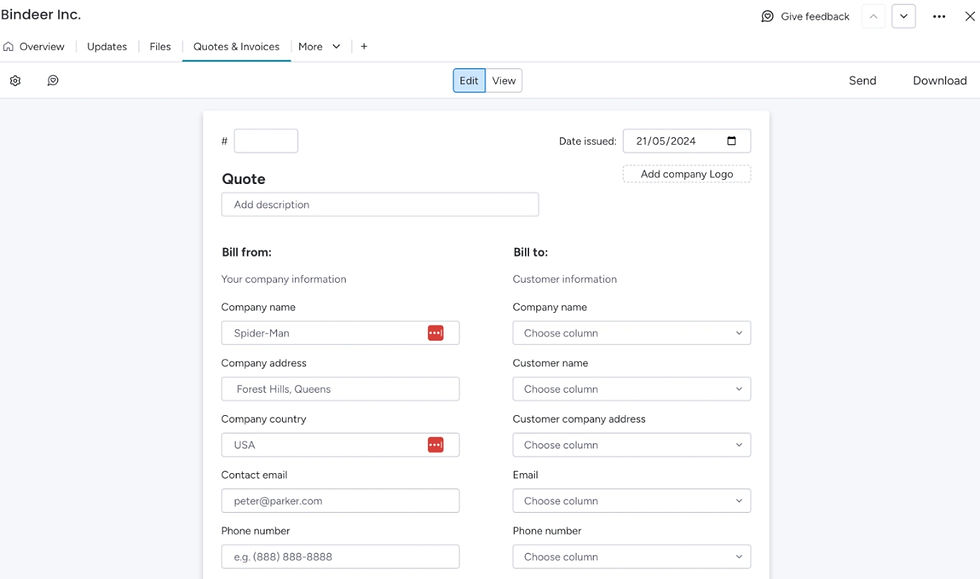
Let's assume that you've used a template to get started on building quotes and invoices. Thankfully, monday CRM offers customisation options:
Edit fields directly to adjust quantities, prices, text, etc.
Select from predefined options that are linked to the template to make real-time adjustments.
Add price adjustments for taxes, additional fees, and discounts.
Any changes you make will be saved to your document and not the original template.
Preview, Save, and Download

Once you're satisfied with how the invoice, proposal, or quote looks, feel free to follow these steps to ensure data integrity:
Preview: This will confirm that the document appears as you want it to and ensure information is correct. Find it in the lower right corner to access real-time rendering in PDF format.
Save: This step will log the document in the Quotes & Invoices board. Some key details, such as issue date, document status and type, client name, will be locked to prevent manual editing.
Download: Beside the Save option, you'll find a dropdown arrow to download the document as a PDF. You can now send this to your clients through your preferred communication method.
How to Track Invoices, Proposals, and Quotes in monday CRM?

All the documents you create will be logged on the Quotes & Invoices board within your monday CRM account. Many columns and their variables here will be locked.
Most columns are locked, but you can still add more to customise the sales team's usage of this monday CRM board. You can also:
Add Automations
To keep things moving efficiently, add these monday automations:
Trigger a notification when the document status changes. (Example: Sent to Paid)
Send follow-up reminders to your sales team if payments haven't been received by the official due date.
Add Columns
Adding columns to your board will personalise it based on your business needs and the sales team's requirements. It's a flexible way to track additional data like priority, location, and more.
Sort & Filter
By default, the documents on this monday CRM board will be sorted by creation date. But you can apply filters to make changes to the way everything's sorted. You can view the invoices or proposals by status, document type, and client.

Best Practices for Using monday Sales CRM Quotes & Invoices
Generating quotes and invoices in monday Sales CRM is efficient and easy to access. Soon, there'll be new releases for external integrations with payment platforms. You'll also be able to sort or separate documents into different groups or tabs.
Indeed, this feature is like the holy grail for your sales team. That's why you must encourage them to follow a few best practices:
Create separate templates for different client types and product lines to differentiate them clearly. This will make sending invoices easy for your team.
Regularly review templates to update invoices, proposals, or quotes with current pricing adjustments, branding, or pricing structures. This will maintain template consistency.
The monday.com team also mentions the need for continuous training and support. With a monday implementation partner at Fruition, you'll be able to initiate internal training programs and open transparent communication.
We'll help your team understand the difference between templates (proposals, invoices, and quotes). It will prevent incorrect usage and accidental manual edits. With Fruition's help, your sales team will get trained on linking boards to templates or managing documents in the Quotes & Invoices board.
FAQs
Can monday.com generate invoices?
Yes, the monday platform can do that through its Quotes & Invoices feature. It's especially available in monday CRM. It allows you to easily generate quotes, invoices, and proposals within the monday workflow. You can also download as PDFs and send them through email within your monday CRM account. There are templates for your sales team to use as it integrates with CRM boards to pull information about contacts, products, and other information.
Does it cost extra to generate Quotes & Invoices in monday CRM?
The Quotes & Invoices feature is only available on monday Pro and Enterprise plans. It'll also be accessible in the 14-day free trial. All you have to do is pay for the Pro or Enterprise plan to create invoices, quotes, and proposals using templates. Unfortunately, you won't find this in the Basic plan.
Is the monday CRM Quotes & Invoices feature good?
Yes, with the Quotes & Invoices, your sales team can manage, track, and create quotes, invoices, or proposals based on templates or from scratch. It also integrates with existing monday CRM boards, making it easy to pull data from products, services, or contacts. With this feature, your team can generate financial documents to manage client transactions efficiently.


