.png)


monday.com Product Roadmap Setup: Structuring High-Level Planning with Baselines and Milestones in 2026
- Ishani Dhar Chowdhury

- 6 days ago
- 7 min read
How do you set up a product roadmap in monday.com?
To set up a monday.com product roadmap, users must build a Product Roadmap board. It will centralise goals, timelines, and features for each quarter.
Once done, you can use milestone tracking in monday to mark key delivery points as diamond icons on the Gantt chart. After that, you should activate product planning baselines to snapshot your original schedule to compare planned vs actual progress.
Together, these features can provide product managers and executives with a real-time view of current product stages. The right monday.com product roadmap setup can also provide a strategic view of delivery health, scope changes, and alignment across entire lifecycles.

What do you think separates high-performing product teams from those who constantly miss deadlines or lose trust? That'll be a well-structured product roadmap.
In monday WorkOS, it's a high-level action plan. This will outline your product goals, direction, and vision, along with planned milestones, timelines, and features.
Research from Strategyzer found that 42% of new product features fail. Why? It's all because teams build things customers don't actually want. That's a failure rooted solely in poor priorities and misaligned planning.
With a professional monday.com product roadmap setup, you can bridge strategy and execution. For some, this has become a game-changer.
Combine structured boards with milestone tracking in monday to gain real-time visibility. It also helps with product planning baselines for executive-level communication.
In this blog post, we'll discuss how to build and optimise product roadmaps in monday.com using agility and strategic clarity.
monday.com Product Roadmap Setup: What Is It?
PMI's Pulse of the Profession report suggests that organisations that undervalue project management complete less than 60% of projects on time and within budget. That's why a structured roadmap tool directly reduces this risk.
In monday WorkOS specifically, it's a high-level, visual plan. It outlines milestones, timelines, and priorities.
Together, they provide a strategic clarity for cross-functional teams, executive stakeholders, and product managers. All in all, the roadmap centralises goals, features, and timelines to help teams align and make informed decisions during the development cycle.

Some of the core components of the monday.com Roadmap Board include the following:
Groups organised by quarter: Each group will represent quarters of the year. It shows what is planned per phase and what remains in the backlog.
Columns for structure: You'll get epic owner, description, timeline, prioritisation, and mirrored sprint data all in one view.
Multiple views: Teams can switch between Kanban, Gantt, Workload, and other views to analyse product data across different angles.
Connected boards: The Epics roadmap links directly to the Tasks board. Hence, strategic epics connect to sprint tasks without switching platforms.
Did you know monday.com ranked #1 for productivity? This tool can help teams visualise and plan product roadmaps to reach every milestone.
How to Set Up the Product Roadmap Board?

Forbes reports that 90% of startups fail. Growing organisations leave the majority of product planning and management without a reference point for tracking progress.
Thankfully, monday.com offers a dedicated Product Roadmap + Features and Releases template for this purpose. Both come pre-configured with quarterly groups, core columns, and a backlog to save setup time.

The key monday.com product roadmap setup includes these:
Choose your Roadmap Board: Either choose the Features & Roadmap Board or the Product Roadmap Template.
Define groups and columns: Organise by quarter (Q1–Q4). Add Owner, Status, Timeline, Priority, and Linked Tasks columns.
Connect to your Tasks Board: Use the Connect Boards column to mirror sprint data, estimated effort, task progress, and assigned items directly on the roadmap view.
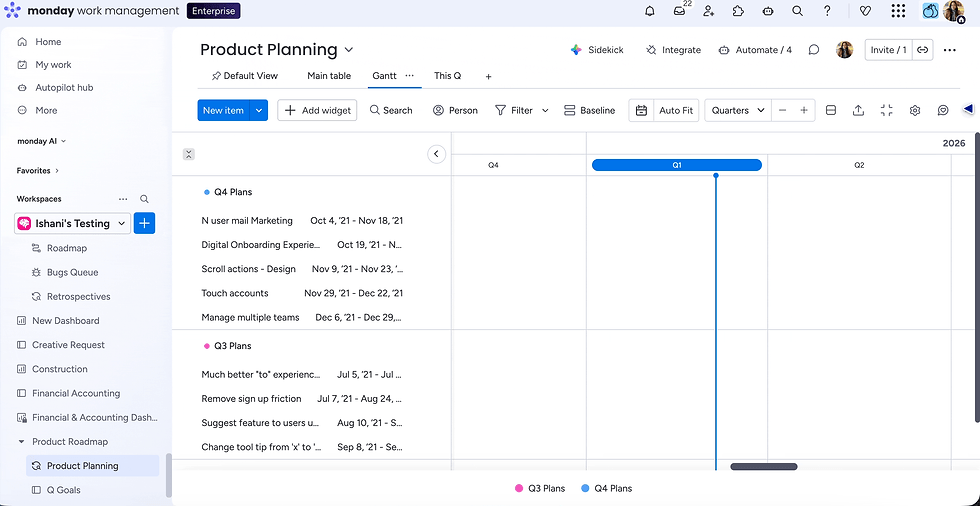
Add the Gantt view: Available on Standard and above. Once upgraded, you can enable Milestones and baselines for high-level planning.
Enable Milestones: In the Gantt, go to Timeline Column settings and check 'Show Set as a Milestone' to mark key delivery points as diamond icons.
Set your baseline: Once the roadmap is approved, go to 'Baseline > Add a new snapshot' in the Gantt to lock your original schedule as a reference point. Available on Pro and Enterprise only.
Build your executive dashboard: Add Gantt, Battery, Numbers, and Chart widgets to a dashboard to give stakeholders a live, high-level view without touching the board itself.

The monday.com consultants at Fruition can build the configurations for you to accelerate time to value. We'll provide the best practices from day one. Our expert services incorporate baselines, milestones, automations, and executive dashboards.
Understanding and Using Baselines in monday.com
A McKinsey study covering over 5,400 large IT projects found that they run 45% over budget and 7% over time. Similarly, they delivered 56% less value than predicted.
This proves how important schedule baselines are for product lifecycle accountability. In monday WorkOS, a product planning baseline is a project management tool used to outline the target schedule of a project.
It serves as a frame of reference to compare current progress against the original plan. But what exactly do these baselines do?
Locks items in their original positions as grey bars beneath current timeline bars.
Turns items green when on track and red (along with dependents) when delayed.
Allows toggling between planned and actual views for stakeholder presentations at any time.
To set a baseline, go to the Gantt view and select 'Baseline.' Then add a new snapshot. You can also add multiple snapshots across the project lifecycle for a complete audit trail.
Note: Baselines are available only on Pro and Enterprise plans.
Milestone Tracking in monday.com: Marking What Matters

Did you know that 78% of individual contributors feel comfortable using project or work management tools? This makes visual milestone tracking a key driver for team-wide adoption.
Milestones mark turning points in any project. Examples include phase completions, launch dates, and major handoffs. In monday WorkOS, milestones appear as diamond icons on the Gantt chart.

Here's how you can enable milestone tracking in monday:
Click the three dots next to the Timeline or Date Column.
Go to Settings.
Select Customise Timeline Column.
Check Show Set as a milestone.
A diamond will be displayed on the chart.
You can also enable Show Group Summary to display a phase-level progress bar at the top of each Gantt group. All that gives executives a clean delivery overview across full product roadmaps.
Being a monday Platinum Partner and Advanced Delivery Status holder, Fruition can help product teams configure advanced workflows and board architectures. We can create roadmap templates tailored to your organisation's planning processes.
Should You Use monday Dev?
monday Dev is a product development platform purpose-built to empower teams with hierarchy board views, customisable dashboards, and AI automations.
For faster roadmap management, you can use these key monday Dev features:
Epics board: High-level epics organised by quarter with built-in backlog management.
Epic breakdown: Centralises all sprint items per epic for a full strategy-to-task hierarchy view.
Agile reporting: Pre-built reports for sprint velocity, team performance, and delivery trends.
Roadmap tracker: Sprint management, GitHub integrations, and Engineering Performance dashboard (Standard Plan and above).
Feature idea management: Centralises feature requests from stakeholders and users, then notifies requesters.
Fruition specialises in monday.com implementations for product and technology teams. We will help you from initial board design and roadmap architecture to ongoing optimisation and training.
Automations Supporting Roadmap Planning
Industry leaders have noted that 45% of project managers spend more than one full day every week on manually reporting status updates. Automation directly addresses this productivity drain.
The automations in monday keep roadmaps accurate without constant manual input. You can use ready-made automation recipes for product roadmap management.
Some examples include:
Status-to-notification: Automatically alert stakeholders when a milestone turns 'At Risk' or 'Delayed'.
Deadline reminders: Send automatic alerts ahead of each feature's scheduled launch date to keep the team on track.
Label change conditions: monday dev requires fields like 'Launch Date' to be filled before an epic can move to 'In Progress.' This enforces data quality across the board.
Cross-board updates: When a task status changes on the Tasks board, automatically update the linked Epic on the roadmap board, keeping both views synchronised.

Amidst all these features, your product team should also follow a few best practices. You should set your baseline at kick-off, mark every major phase transition as a milestone, use RICE scoring, re-baseline after scope changes, and automate status digests.
To End With
Statistics report that the global product roadmap software market is growing. It'll be valued at USD 3.4 billion by 2032, exhibiting a CAGR of 9.5%.
A well-structured monday.com product roadmap setup is indeed the foundation of strategic product planning. For instance, you can track scope changes and milestones using product planning baselines.
That way, you can communicate key delivery points with agility and executive alignment. Product teams can also gain proper visibility to deliver on their product vision.
You can use features like connecting the Epics Board to Sprint Tasks, activating Gantt baselines, and building executive dashboards. Everything will directly impact delivery confidence and stakeholder trust.
Do you want to get the most from your monday.com investment? Fruition can help you do it right. Reach out today to start building a roadmap structure that your entire organisation relies on.
FAQs
Can you use the monday.com Product Roadmap template without a pain plan?
The basic board is accessible on both Basic and free plans. However, the Gantt view requires users to upgrade to the Standard plan. Baselines and other advanced Milestone features are exclusive to the Enterprise and Pro plans.
How many baselines can you set on a single monday.com Gantt chart?
monday WorkOS supports multiple named baseline snapshots for every Gantt view. These are usually stored independently. You can also maintain a full version history of approved schedules throughout the product lifecycle.
Can external stakeholders view the monday.com roadmap?
Yes, you can share Gantt views via a shareable link or embed code. This gives guests read-only access with no monday.com account requirements. Board members can still view it whenever they want.


